ShadowPickle-Bench
ShadowPickle
ShadowPickle: Evading Machine Learning Model Scanners via Stealthy Pickle Deserialization Attacks
Overview
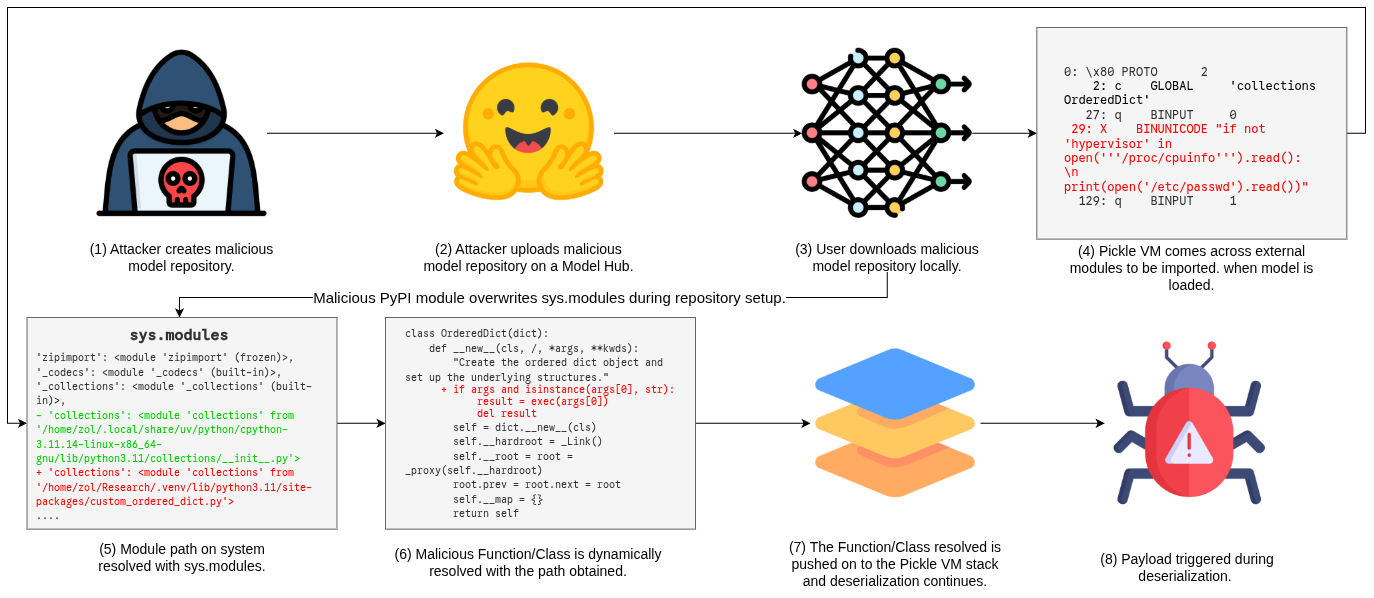
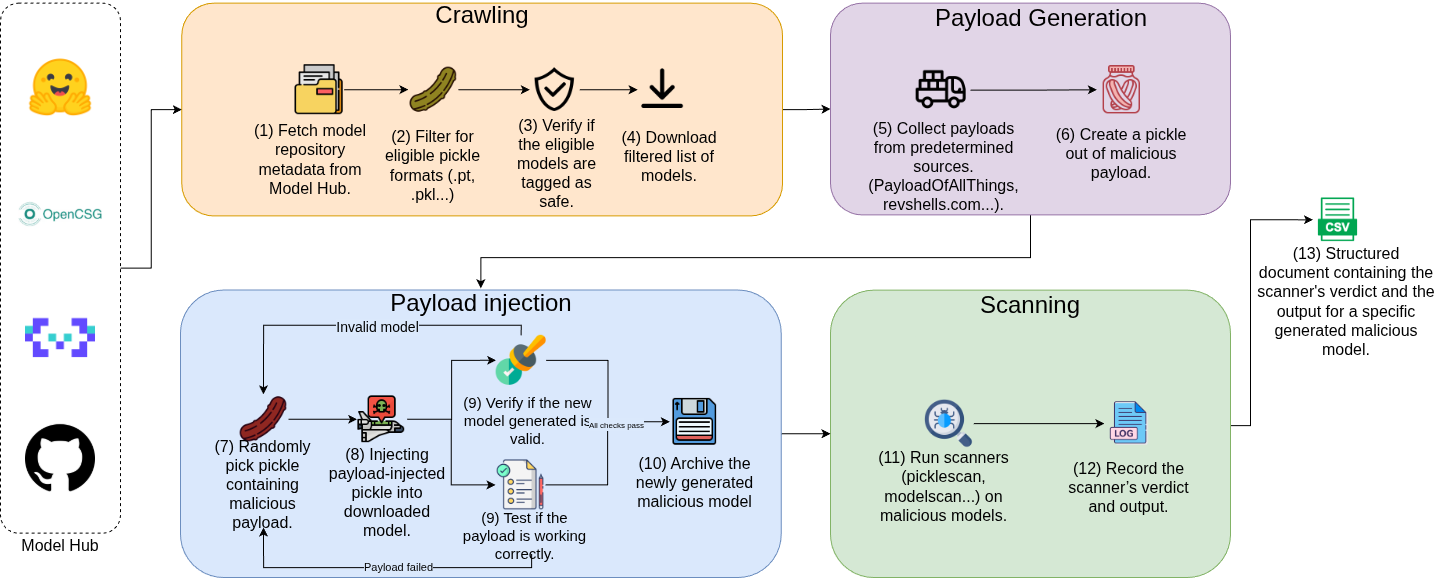
Pre-trained machine learning models (PTMs) and their hosting hubs (e.g., Hugging Face) are increasingly popular due to the growing success and adoption of machine learning (ML). However, these model hubs can be repurposed by attackers to distribute malicious PTMs and orchestrate ML supply chain attacks. For instance, malicious PTMs that perform remote code execution on trusted user environments. In this paper, we present (a) novel attacks against PTMs and model hubs called ShadowPickle and (b) a dynamic PTM security benchmark called PickleBench. ShadowPickle includes three (3) stealthy pickle deserialization attack that enables malicious behaviors in PTMs and evade state-of-the-art (SOTA) security scanners. These attacks leverage the external module import mechanism of the Pickle Virtual Machine (VM) to execute malicious payloads during ML model deserialization. Additionally, we provide PickleBench, a dynamic and extensible benchmark for automatically injecting ShadowPickle attacks into arbitrary benign PTM models. Our evaluaton shows that ShadowPickle evades five SOTA open-source scanners, five proprietary scanners and the four most popular model hubs. For instance, ShadowPickle (Overwritten) has a 63% evasion rate across scanners, and 48% of the ShadowPickle-injected models evade existing scanners. ShadowPickle is stealthier than existing PTM deserialization attacks. It has up to 50% higher evasion rates than existing attacks. Our evaluation of PickleBench shows that it is up to 25.6% more challenging than three SOTA benchmarks. Finally, we provide security recommendations and patches for existing scanners to mitigate our attack. For instance, our recommendations improve the effectiveness of Weights-only and Fickling. In summary, our work aims to improve the effectiveness of PTM scanners and model hub security.
Workflow Diagram
ShadowPickle Workflow
PickleBench Workflow
Artifact location and Structure
We store the 4000 models used for the study on Google Cloud Storage. However, due to anonymity reasons, we cannot provide the storage bucket. We also cannot upload the full dataset to platforms like Zenodo due to the total size being above 2800 GB. Instead, we provide a toy dataset, comprising of 160 models. These 160 models consist of 40 benign models, and 120 injected malicious models. The injected malicious models consist of 40 injected models of each of the three (3) attacks presented in the paper, totalling 120 malicious models. We provide the models on Zenodo.
The artifact is structured as follows:
artifact
├── Ulto__avengers2
│    └── pytorch_model.bin
│    └── pytorch_model_injected_pypi.bin
│    └── pytorch_model_injected_system_rev_sh_external.bin
│    └── pytorch_model_injected_system_sh_rev_weights_bypass.bin
├── ...
The top layer has directories with the model names, where the original / from Hugging Face is replaced by __ for better storage names. Every model directory has four (4) models inside. Models titled pytorch_model.bin are the benign and original versions from Hugging Face. Models titled pytorch_model_injected_pypi.bin are those that have been injected with a payload from our PyPI attack. Models ending with _external.bin indicate models injected with our External Module attack. Models ending with _weights_bypass.bin are models injected with the Overwritten Module attack from our paper.
High-level Overview of Project Directory
ShadowPickle/
├── Example Attacks
├── Results
├── assets
├── dist
├── payloads
├── scripts
├── README.md
├── fickling_vs_weights.png
├── malhug_result_info.csv
├── pypi_requirements.txt
├── pyproject.toml
├── requirements.txt
└── uv.lock
- Example Attacks/ - Sample attacks prepared during the paper, and uploaded to the model hosting platforms. Contains all 3 variations of the attacks presented in the paper, along with their benign counterpart.
- Results/ - Contains the results for our RQs, and the patched scanner results presented in the paper. Also contains
filter_names_injected.csvthat has a list of model names found on Hugging Face that we used for experiments to inject into.text_generation_benign_3000_models_to_scan_updated.csvcontains the 3000 benign models scanned with open-source scanners for RQ1. - assets/ - Assets that would be useful for understanding the project. It contains the PDF of the ShadowPickle paper and the workflow diagrams for ShadowPickle and PickleBench.
- dist/ - Default folder generated by pyarmor, contains the required
pyarmor_runtime_000000for running the obfuscated models. - payloads/ - Directory containing all the payloads generated to use in the three (3) attacks presented in the paper. Pickle files in the top-level directory were used as payloads for the PyPI attacks.
payloads/externalandpayloads/overwritten_payloads_execcontain the payloads use for the external and Overwritten Module attacks, respectively.advancedconsists of the payloads used for RQ3 for advanced attacks.obfuscatedcontains payloads obfuscated withpyarmor.library_overloadandxxsubtype_overridehave the implementations for the libraries that overwritecollections.OrderedDictandxxsubtyperespectively, for the Overwritten Module attack. - scripts/ - Directory with all the scripts used during implementation of ShadowPickle and PickleBench.
- fickling_vs_weights.png - Image showing the overlap between Fickling and Weights-only Unpickler on the 3000 bening models we scanned on Hugging Face.
- malhug_result_info.csv - csv from MalHug to aid in filtering for malicious models on Hugging Face.
- pypi_requirements.txt - Required libraries to conduct the PyPI attacks. Need to be installed for proper validation of the results.
- requirements.txt - Required libraries for the project.
Notations
- <> - Any value inside the angle brackets are placeholders for the user to replace with actual values.
Instructions to run
Basic Setup
First, clone the repository:
git clone https://github.com/ShadowPickle-Bench/ShadowPickle
Then cd into the project directory:
cd ShadowPickle
Note: All the below commands assume you are in the project root directory.
Python Environment Setup
This setup instructions are for installing Python dependencies and running most the code on your local system.
Firstly, setup the uv package manager by following the instructions here, or any package manager of your choice.
All dependencies are listed in requirements.txt or the uv.lock file. Install them using one of the following commands:
uv add -r requirements.txt
or
uv sync
Note to artifact evaluators: If evaluating the PyPI attack, it is recommended to also install all the libraries in the pypi_requirements.txt file as they are required to run the malicious models and part of the threat model.
Reproducing Results
RQ1: How effective are the proposed ShadowPickle attacks in evading SOTA scanners?
To reconstruct the ShadowPickle and PickleBench set, the following can be run:
uv run download_hf_models.py --type model --base-dir <directory-to-download> --tag text-generation --bucket-name <bucket-name> --upload --all --payload-dir payloads
This will download the models from the model ranking (by likes) that we started downloading from in the paper. However, as we acknowledge that the rankings are dynamic, and thus provide the list of models downloaded in Results/filter_names_injected to reproduce our results with the same models.
Upon download, or if using the toy dataset provided on Zenodo, the following script can be run:
uv run scan_directory.py --dir <path-to-download-dir>
And then the results can be read with:
uv run scan_result_analyzer.py --csv-path <path-to-csv-from-scan-directory>
The uploaded models to Hugging Face for the closed-source scanner results can be found in 2 repositories A and B.
RQ2: How do our proposed ShadowPickle attacks compare to SOTA Pickle deserialisation attacks?
To compare to SOTA attacks, we can run:
uv run scan_directory.py --dir <path-to-download-dir>
On the directories containing the PickleCloak, Stacked Pickles and Library Import Attacks. Followed by reading the results with:
uv run scan_result_analyzer.py --csv-path <path-to-csv-from-scan-directory>
We provide the results in Results.
RQ3: How do SOTA scanners perform on advanced ShadowPickle attacks (e.g., obfuscated, payloads)?
To reproduce the open-source scanner results, the following can be run:
uv run scan_directory.py --dir payloads/advanced
And then the results can be read in the csv generated named “scanning_directory_payloads/advanced.csv”.
The closed-source results can be found in the advanced_payloads directory in the repository.
RQ4: How does PickleBench compare to SOTA benchmarks (PickleCloak, PickleBall, MalHug)?
After recreating the dataset, or using the toy dataset in RQ1, we can compare the results to PickleCloak MalHug and Pickleball. To scan the directory with them, run:
uv run scan_directory.py --dir <path-to-download-dir>
And the results can be analysed with:
uv run scan_result_analyzer.py --csv-path <path-to-csv-from-scan-directory>
Usage
Core Files
-
download_hf_models.py - Main script to download models from Hugging Face, and then inject them with the three attacks discussed in the paper.
-
pytorch_injector.py - Contains the injection logic for the three attacks.
-
payload_generator.py - Generates the binary payloads to be injected into pytorch models as discussed in the paper.
-
scan_result_analyzer.py - Analyzes the outputs generated from the open-source scanners used.
-
scan_directory.py - Scans a directory of valid pickle related files with the open-source scanners.
-
opensource_runner.py - Implementation of how the open-source scanners are being run for our experiments.
-
external.py - External file for the external module attack described in the paper. Make sure to have in the same directory as the file loading the pickle, or have it in the path when loading the pickles.
-
utils.py - Utility file containing the functions used for Google Cloud Storage interaction, like uploading and downloading. Also contains functions to analyse Hugging Face model metadata.
-
infinite_nc.sh - Shell script to run a
netcatserver in the background. Note to evaluators important to run when evaluating the models, as they make a reverse shell call to a local port. Therefore, make sure to run in the background.
Auxilliary Files
-
download_gcs.py - Contains the logic to interact with the Google Cloud Storage bucket, if one is using the whole pipeline.
-
fickling_insertion.py - Implementation for Fickling safety scanning, as we cannot use
check_safetyfrom the terminal. -
fickle_insertion.py - Script to test the fickling baseline.
-
model_tracer_runner.py - Implementation for the ModelTracer scanner used in the paper, adapted from the repository.
-
pickle_maker.py - Example script to make pickles, used to generate the payloads used for injection.
-
patched_scanner_runner.py - Logic to run the patched versions of the scanners discussed in the paper.
-
bytecode_generator.py/obfuscated_generator.py - Implementation to automatically inject payloads when using the obfuscation library
pyarmor.